How do I get hair in Makeup Mania?
After the face is painted, open Catalog from the skin controls, select hair, type the style you want, equip it, and press the plus sign if it sits back in the head.

Makeup Mania hair guide: stack a base style and bangs. Second Hair Slot is 99 Robux and Unverified. Avoid face clipping. Place 117935850321807. October 2026.
Catalog hair plus plus-sign forward. Second slot Unverified.
~10 min read
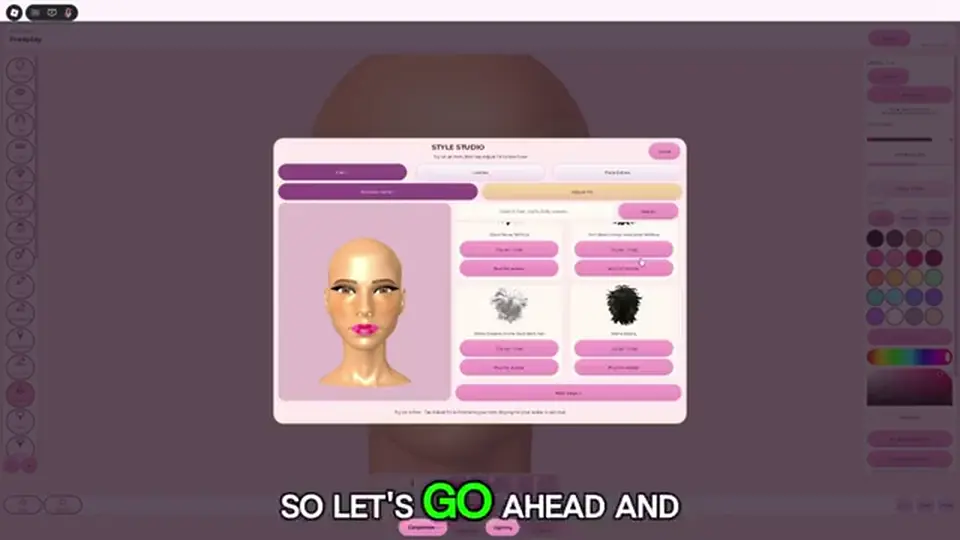
Makeup Mania hair on Place 117935850321807 by Make-up Mania! is a Catalog style you search after the face is painted. Open the same skin controls that lead into Catalog, select hair, type what you want, and press the plus sign to bring a sunk style forward. One style is the free round. Checked October 6, 2026. Play on Roblox.
Second Hair Slot is listed at 99 Robux so two styles can sit together. VIP is listed at 399 Robux with a second hair among its perks. Both the 99 price and the VIP inclusion are Unverified. No full hair catalog is published. Group 409491256 posts updates; it does not hand out a style list.
| Fact | Detail |
|---|---|
| Place | 117935850321807 |
| Where | Skin controls → Catalog → hair |
| Search | Type the style you want on the hair row |
| First equip | Often looks strange and sits back |
| Plus | Brings that style forward |
| Free path | One style. Enough for a first round |
| Second Hair Slot | 99 Robux to wear two styles — Unverified |
| VIP | 399 Robux; perk list includes a second hair — Unverified |
| Done when | The style frames the face and leaves lids, liner, and lips visible |
| Checked | October 6, 2026 |
Matched by build plan, shared topics, and guide progression — not random related links.
Catalog opens from the character controls in the same beat as changing skin. That door is the confusing step after the lips are blocked in. Hair and face accessories both live there. Hair is the row you search first in that menu; lashes are the next row, on lashes.

| Menu row | What it does | This page |
|---|---|---|
| Skin / character change | Door into Catalog after the canvas | Use it to leave the brush |
| Hair | Search and equip a 3D style | This is the row |
| Plus | Brings a buried style forward | Press it before you judge the shape |
| Face accessories | Lash search | Next row — lashes |
| Brush tray | Foundation through lips | Already done — vanity |
The style will look strange at first. That is the cue to use plus, not the cue to delete the result and retype the same word. Re-searching does not pull a sunk mesh out of the head. Leave it equipped and move to the plus control in the next section.
Plus is a depth nudge for the style you just equipped. The first frame often sits back in the head. Press the plus sign to bring it forward until it reads as hair on the avatar, then stop.
| What you see | Control | Stop when |
|---|---|---|
| Mesh inside the head or stuck behind the face | Plus | The style sits on the avatar instead of inside it |
| Style looks strange the moment you equip it | Plus, before a new search | You can see the silhouette against the painted face |
| Hair already clear of the skull and covering an eye | Different search | Plus will not turn bangs into a side part |
| You wanted a second mesh | Second Hair Slot, if owned | Plus never adds a slot |
| You are on face accessories | Switch back to the hair row | The lash gizmo does not move hair |
The catalog step names one control: the plus sign, used because the equip looks strange and sits back. There is no published scale, tilt, or minus for hair on this wiki. If plus has brought the style out and the shape still covers a lid, change the search. Spinning a lash gizmo will not restyle a hair mesh.
Players treat plus as “add another hairstyle.” It brings the current style forward. A second simultaneous style is the Second Hair Slot, priced in third-party notes at 99 Robux and still Unverified. Owning nothing extra, you still get one style and the plus control.
Check the avatar after the nudge, at a normal face view, not only the extreme zoom you used for liner. The next section is when a second mesh is actually the tool you need.
Buy nothing until one style is forward and the face still reads. The slot is a stack, not a fix for a bad search. Prices below are third-party shop notes. The Roblox listing does not print them.
| Option | Listed price | What you get | Status |
|---|---|---|---|
| Free hair | 0 | One Catalog style, plus to bring it forward | This is the round-one path |
| Second Hair Slot | 99 Robux | Two styles at once | Unverified |
| VIP | 399 Robux | Perk notes include a second hair, plus other perks | Unverified. The included slot is Unverified |
| Saved Looks / Shape Stencils | 149 / 199 Robux | Looks and stamp shapes, not a hair mesh | Different passes — gamepasses |
If you already own a second style’s worth of clutter and one mesh cannot frame the face, Second Hair Slot is the pass that matches the job: two styles together. Confirm 99 Robux on the live shop before you spend. A blog price is not a receipt. Skip the purchase when the first style already leaves both eyes out.
VIP’s listed perk line includes a second hair. That inclusion is Unverified, and the 399 Robux figure is Unverified. A free round never needs VIP to search hair or to press plus. If the only perk you want is the extra mesh, the smaller unverified price is the 99 Robux slot, and only after you have read the live description. Daily theme picks, stencils, and a tag are VIP notes, not hair tools. The buy order lives on gamepasses.
Third-party notes give the design phase 300 seconds. That timer is Unverified. Whether or not your HUD shows it, a pass shop in the middle of brows is how the liner never gets drawn. Finish one style, then decide. Stacking a second mesh over a half-painted face makes the coverage problem worse, which is the check in the next section.
Clipping here means the style covers the work you already did: bangs through the lash band, volume through the liner, or a second mesh over the mouth. The try-on happens after the lips exist, on the avatar, not as a brush stroke.
| Neighbor | What you want | When it fails |
|---|---|---|
| Lashes | Band and hairs still visible beside the style | Bangs through the pair. Change the search |
| Liner | Wing readable at a normal face view | Volume parked on the outer corner |
| Brows | A gap under the hairline | The style starts so low it replaces the brow you mirrored |
| Lips | Mouth still a shape | A long piece dropped over the second lip color |
| Second mesh | Only if the slot is owned and the first style is already clear | Two styles stacked until neither eye shows |
| Vote camera | The face reads without the vanity zoom | Catwalk distance — runway |
Hair try-on sits after the lip color. The face you painted is the ruler. Equip, plus forward, then look. Eye color is a separate skin control you can change around the same beat; it does not move the mesh. If the style only looks balanced in a tight zoom, it will swallow the brows when the camera pulls back.
Plus fixes depth. It does not cut bangs. A style that crosses the lash root after it is forward is the wrong result for this face. Search again and equip a shape that leaves both lids out. Theme drama can take more volume beside the face. A clean banner wants the smallest silhouette that still frames the jaw. Color maps, when the banner needs them, are on themes.
The 99 Robux slot stacks. It does not auto-place the new mesh in a safe gap. Put the second style on only after the first one passes the eye test, and take it off if the pair covers liner. Round one can finish with a single style. The mistakes below are what to scan before you vote.
If the vote camera shows a wig and no makeup, the miss is the row, the plus, the shape, or a second mesh. Run this list before you repaint the canvas.
| What you see | Fix |
|---|---|
| No hair tool in the brush tray | Expected. Catalog, hair row |
| Search returns lashes | You are on face accessories. Select hair and type the style |
| Style stuck inside the head | Press plus to bring it forward |
| Plus pressed and the eyes are still gone | The shape is wrong. Search a different style |
| Hunting a blog style name that is not in search | Equip any result whose silhouette leaves the lids out |
| Bought VIP to wear one style | One style is free. VIP’s second hair is Unverified and unnecessary here |
| Second mesh equipped “to be safe” | Remove it unless the first style already passes the eye test |
| Perfect in zoom, gone on stage | Check at catwalk distance, then change the search if the face vanishes |
| Advice from Makeup Mania 3D or a flash makeup page | Ignore it. This BETA is Place 117935850321807 |
Plus once, look, then decide if the silhouette works. A second press is not a new hairstyle. When the lids and the liner are still there, stop scrolling. Extra styles “for volume” are how a readable face becomes a hood.
Then vote. Star widgets and room size stay Unverified on the beginner guide. The hair job is finished when one style frames the paint, not when a second slot is owned.
Lash seat before you judge bangs: lashes. Canvas order: vanity.
Pass shop, still Unverified: gamepasses. Theme read: themes. Vote camera: runway.
After the face is painted, open Catalog from the skin controls, select hair, type the style you want, equip it, and press the plus sign if it sits back in the head.
A new equip often looks strange and sits back. Press the plus sign to bring it forward. Searching the same word again does not pull it out.
Third-party notes price Second Hair Slot at 99 Robux so two styles can be worn together. That price is Unverified until the live pass shop shows it. One style does not need the slot.
VIP is listed at 399 Robux with a second hair among its perks. The price and that inclusion are Unverified. You do not need VIP to search hair or to use plus.
Bring the style forward with plus, then change the search if bangs cross the lashes or the liner. A second stacked style makes coverage worse when the first style already fails the eye test.
No. The canvas is skin, foundation, brows, shadow, liner, and lips. Hair is a Catalog mesh. Brush steps stay on vanity.
Matched by build plan, shared topics, and guide progression — not random related links.